Author: Maxi
Mod Website: https://forums.ahwoo.com/threads/autostage.891/
Downloads: 840
Followers: 1
Outdated Mod
This mod is not known to work with the latest version of Kitten Space Agency. Proceed with caution.
**AutoStage has been archived. As of AdvancedFlightComputer v0.8.0, automatic staging is a feature of AdvancedFlightComputer, with everything this mod did.
The final release (v0.4.0) stays available but will not receive further updates. If you install AdvancedFlightComputer, delete the AutoStage folder under Documents\My Games\Kitten Space Agency\mods.**
Automatic staging for Kitten Space Agency.
Activates the next sequence whenever active engines run out of propellant, and drops burnt-out boosters while the rest of the stage keeps firing. Works during auto-burns (continues the burn instead of aborting) and manual burns.
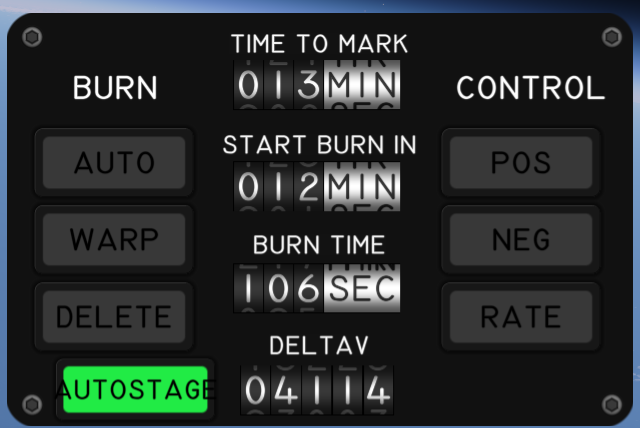
Features
- AUTOSTAGE toggle button on the BurnControl gauge panel
- Auto-burn continuation - keeps BurnMode=Auto through staging so planned burns don't abort
- Cascade staging - stages again if the next stage is empty or only has decouplers
- Spent stage drop - sheds burnt-out boosters as soon as they quit, without waiting for the core stage to run dry
- Configurable staging delays - independent delays for decouplers and engines, simulating realistic separation and engine spool-up
- On-screen countdowns - "Decouple in X.Xs" and "Ignition in X.Xs" alerts during a delayed stage so you can see what's about to happen
Spent Stage Drop
A launch stage that mixes solid boosters with a liquid core does not run out of propellant all at once. In most configs, the boosters burn out first and get dropped while the core stages continues burning. Until now AutoStage waited for every active engine to go dry, so burnt-out boosters rode along as dead mass until the core quit too. It now drops them as soon as they are spent, while the rest of the stage keeps firing.
AutoStage therefore also stages when the next sequence would jettison nothing but burnt-out hardware. Before staging it works out which parts each decoupler in that sequence would separate, and only fires when the sequence activates no engine, every active engine in the jettisoned parts is spent, at least one engine that stays is still firing, and nothing jettisoned is an engine that has never run or still feeds an engine that stays.
Vehicles that do not mix engine types never see a jettison with both spent and firing engines, so their staging is unchanged. Turn it off with "Drop spent stages early" in the settings window if you want staging to wait for a full burnout.
Staging Delays
Two delays are configurable per part variant, both measured from the staging trigger:
- Engine ignition delay - default values per stock engine variant (small EngineA1 ignites after 2 s, EngineA3 after 3 s, etc.)
- Decoupler delay - default 0 s (matches stock behaviour)
Set the decoupler delay shorter than the engine delay if you want the lower stage to drop away before the upper stage lights up.
Configuration
- Settings window (Settings > Mods > AutoStage Settings): a "Drop spent stages early" checkbox, then two sections, one for engine ignition delays, one for decoupler delays. Lists every known part variant. Click "Save" to persist.
- Part Window (right-click part > Window): override the delay for a specific sequence on the current vehicle. Per-vehicle overrides take priority over the global config.
Configs live in Documents\My Games\Kitten Space Agency\mods\AutoStage\. Removing the mod does not affect game saves.
Installation
- Install StarMap and KittenExtensions.
- Extract the SpaceDock zip into
Documents\My Games\Kitten Space Agency\mods\AutoStage\. - The game auto-discovers new mods on next launch.
Dependencies
| Package | Purpose | Tested version |
|---|---|---|
| StarMap | Mod loader | 0.4.5 |
| KittenExtensions | Required for XML patching | 0.4.0 |
License
MIT. Source code, issue tracker, full changelog: https://github.com/Maximilian-Nesslauer/KSA-AutoStage
Forum thread: https://forums.ahwoo.com/threads/autostage.891/
Stats for AutoStage
Downloads over time
Downloads per version
New followers per day
Top Referrers
- spacedock.info
- www.google.com
- sd-prod-live.52k.de
- sd1b.52k.de
- sd-prod-stage.52k.de
- sd1a.52k.de
- forums.ahwoo.com
- yandex.ru
- None
- areweksayet.com
Export Raw Stats
Raw stats are from the beginning of time until now. Each follower and download entry represents one hour of data. Uneventful hours are omitted.